

Your design. Your statement.
Would you like to have your chair printed and designed with an individual claim, logo, or photo? With the director's chair configurator, you can easily personalize your chair: straightforward, quick & according to your wishes.
This is how you quickly apply your design to the chair:
1
Upload
Simply upload your design (SVG or PNG) in the configurator.
2
Preview
See how your director's chair with personalization looks in the live preview.
3
Design
Slide, rotate and design until everything fits. We don't print until you're 100% happy.
Was kostet dein individuelles Design?
Über das Motiv entscheidest du! Wir kümmern uns dann mit dem Digitaldruckverfahren darum, dass dein Design auf dem Bezug optimal zur Geltung kommt.
23 €
46 €
Personalisierbarer Druckbereich für deinen Stuhl
Die druckbare Fläche hängt von deinem gewählten Stuhl-Modell ab. Damit das Design perfekt sitzt, platzierst du es am besten innerhalb der gekennzeichneten Druckfläche, also zwischen den Nähten. Die exakten Größen der Druckfläche kannst du der Tabelle entnehmen.
38 x 14 cm
35 x 25 cm
38 x 16 cm
27 x 10 cm
35 x 20 cm
28 x 20 cm
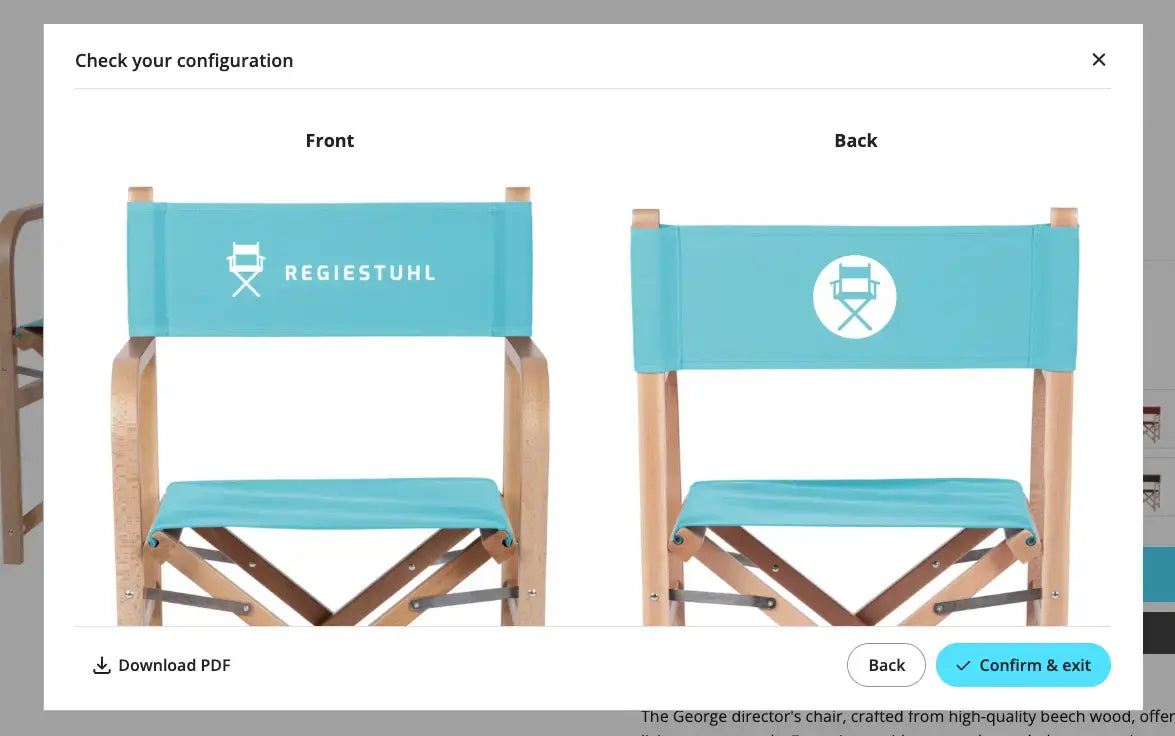
Print preview
If you order directly from the online shop and configure your chair individually, you will see a preview of your design during personalization.
The right file format makes all the difference
For logos
For logos or graphics, we recommend a vectorized file, preferably SVG. Alternatively, a high-resolution PNG with a transparent background is also suitable.
For photos
For photo prints like a vacation picture or a group photo, a good, high-resolution JPG is usually sufficient.
For texts
If you would like to use a specific font for your individual chair print, please convert the text to paths/outlines and upload it as an SVG in the configurator. This will ensure your design is printed as desired.
For logos or graphics, we recommend a vectorized file, preferably SVG. Alternatively, a high-resolution PNG with a transparent background is also suitable.
For photo prints like a vacation picture or a group photo, a good, high-resolution JPG is usually sufficient.
If you would like to use a specific font for your individual chair print, please convert the text to paths/outlines and upload it as an SVG in the configurator. This will ensure your design is printed as desired.

Differences between vector and pixel files
For the perfect print of your logo on a director's chair or deck chair, the correct file format is crucial. Here's why:
Vector file (.svg): Perfect for printing: Vector graphics consist of lines, not pixels – this ensures your logo always remains razor-sharp. Transparent backgrounds are also possible, preventing white boxes from appearing.
Pixel file (.jpg, .png): Consists of pixels – when enlarged, the logo quickly becomes blurry. And since JPGs do not support transparency, a white background will appear, which remains visible in print.

without background

with background
Important notes
✔ Double-sided printing: For light-colored fabrics, we do not recommend double-sided printing, as it may show through slightly.
✔ Change file format: Simply changing the file extension (e.g., changing .bmp to .svg) unfortunately does not work – technically it remains a BMP. You must open the file and save it in the new format.
✔ Convert fonts to paths: If your logo or design contains text, the fonts must be converted to paths/curves. This ensures that your graphic and text are printed exactly as you expect. It also means you are not dependent on the fonts available on our computers.
Tip: A graphic designer, or advertising agency can help you with this – usually with programs like Adobe Illustrator or Sketch.