

Your logo. Your slogan.
We offer custom printing of director's chairs and deckchairs for companies, events & brands. Whether it's a company logo, branding, or merchandising – we professionally apply your design to our chairs. Send us your design via email or use the configurator.
How to quickly apply your corporate design to the chair:
1
Upload
Simply upload your company logo (SVG or PNG) in the configurator.
2
Preview
Check in the live preview how your director's chair with branding will look.
3
Design
Position and scale your logo as you wish. Only then will we print.
Preise für deinen Logo-Druck
Platziere dein Logo oder deinen Claim prominent auf der Rückenlehne und sorge für echte Markenpräsenz! Mithilfe unseres Digitaldruckverfahrens kümmern wir uns darum, dass dein Design auch sitzt.
23 €
46 €
Bedruckbare Fläche
Die bedruckbaren Flächen variieren je nach gewähltem Modell. Die Flächen liegen immer innerhalb der Stoffnähte. Die genauen Größen der Druckfläche kannst du der Tabelle entnehmen.
38 x 14 cm
35 x 25 cm
38 x 16 cm
27 x 10 cm
35 x 20 cm
28 x 20 cm
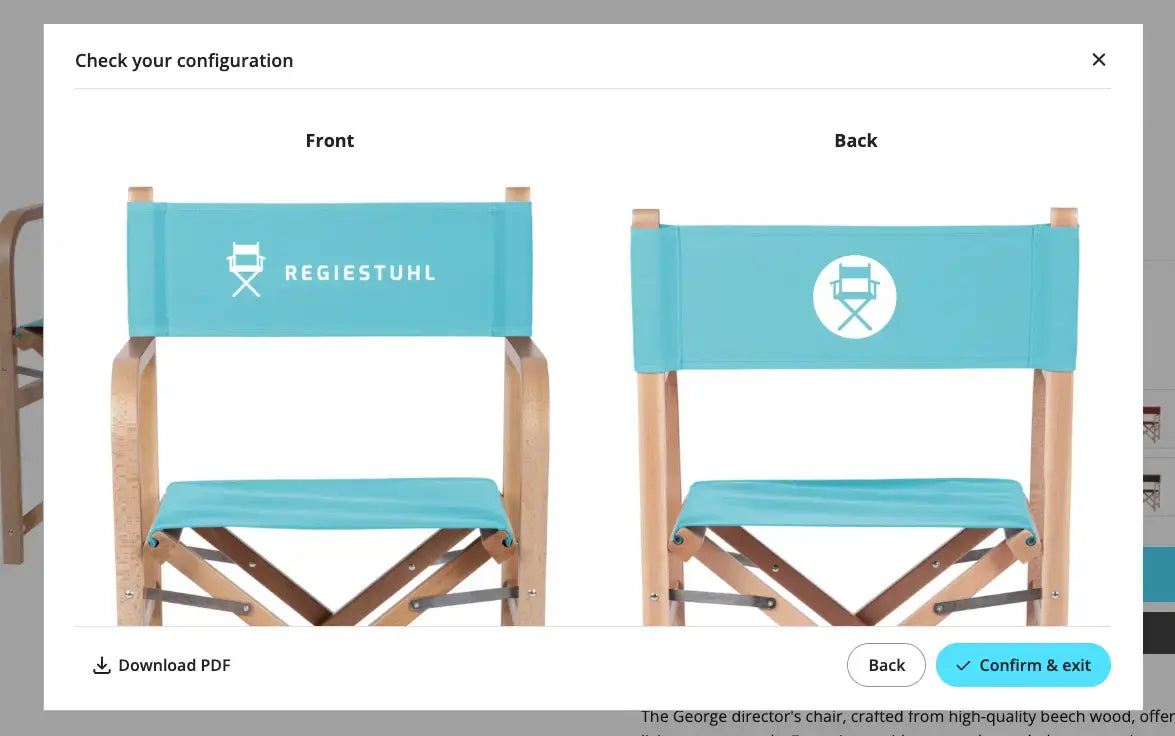
Print preview
If you order and configure in the online shop, you will directly see a design preview. For email orders, we will send you a separate print preview for review and approval. We will only start production after we receive your "go"!
Which file format is the right one?
For logos
For the best look, we recommend providing your logo as an SVG file (vector). This ensures your branding remains sharp regardless of the chosen size. Alternatively, a high-resolution PNG with a transparent background is also suitable. With these formats, you can also design your chair directly in the configurator.
For photos
For photo prints such as a team photo, a good, high-resolution JPG is usually sufficient.
For texts
Do you want to use your own brand font? Simply convert text to paths (SVG) and upload it as a file. This way, your CI remains unadulterated.
For the best look, we recommend providing your logo as an SVG file (vector). This ensures your branding remains sharp regardless of the chosen size. Alternatively, a high-resolution PNG with a transparent background is also suitable. With these formats, you can also design your chair directly in the configurator.
For photo prints such as a team photo, a good, high-resolution JPG is usually sufficient.
Do you want to use your own brand font? Simply convert text to paths (SVG) and upload it as a file. This way, your CI remains unadulterated.
Differences between vector and pixel files
For the perfect print of your logo on a director's chair or deckchair, the correct file format is crucial. Here's why:
Vector file (.svg): Perfect for printing: Vector graphics consist of lines, not pixels. This ensures your logo always remains razor-sharp. Transparent backgrounds are also possible, so no white boxes appear.
Pixel file (.jpg, .png): Consists of image points (pixels) – when enlarged, the logo quickly becomes blurry. And since JPEGs do not support transparency, a white background appears that remains visible in print.

without background

with background
Order by email
You can also send us a direct inquiry by email to info@regiestuhl.de :
- Send us your logo as an SVG, EPS or AI file and the desired chair model.
- We will create a print preview for you.
- After your approval, we will start production.
Important notes
✔ Double-sided printing: For light-colored fabrics, we do not recommend double-sided printing, as it may show through slightly.
✔ Export file format correctly: Simply renaming the file extension (e.g., .bmp to .svg) does not change the file type – technically, the file remains in its original format. It's better to open the file in a graphics program and export it correctly as a vector or print file (e.g., .svg).
✔ Convert fonts to outlines: If your design contains fonts, these must be converted to outlines or curves. This is the only way we can ensure that the print exactly matches your layout – regardless of whether we have the font used installed on our system.
Tip: Most graphics programs such as Adobe Illustrator, Affinity Designer, or Sketch support this conversion with just a few clicks. If you need assistance, your graphics department or agency will be happy to help.